
Camera FOV & Coverage Calculator
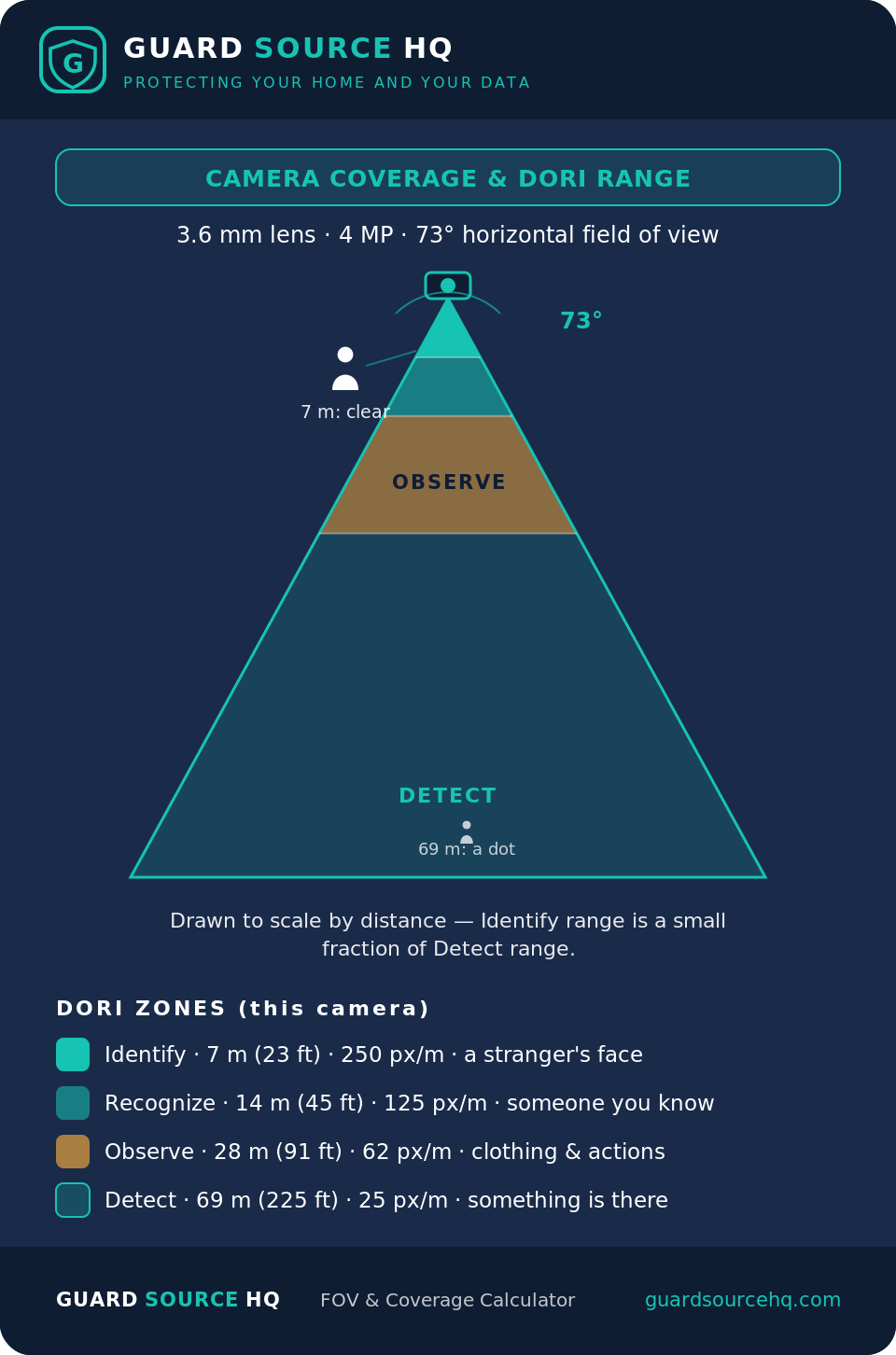
How wide does your camera see, and how far can it actually identify a face versus just spot movement? Enter your lens and resolution below. Distances use the DORI standard (EN 62676-4), the industry measure for camera coverage.
Coverage width grows the farther out you measure; the DORI distances above are the maximum range at which each level of detail is possible. Assumes a 1/2.8″ sensor (typical for IP cameras) and ideal lighting — real range drops in low light, rain, or with a dirty lens. Mount for the detail you need: a face ID at the door needs a much closer/narrower setup than wide yard coverage.
Source: Guard Source HQ — guardsourcehq.com/camera-fov-calculator. Free to cite with attribution and a link back.
How to Use This Tool
This calculator is for anyone deciding where to place a camera or which lens to buy, who wants to know what the footage will actually show at a given distance. You’ll need two things: the lens focal length in millimeters (printed on the camera or its spec sheet — 2.8 mm and 3.6 mm are the common wide lenses, and varifocal models list a range), and the camera’s resolution.
Pick your lens and resolution, and the tool returns the horizontal field of view in degrees plus four DORI distances: Detect (something is there), Observe (clothing, behavior), Recognize (a known person), and Identify (a stranger’s face). Read them as maximums — the farthest point at which each level of detail still holds. Match the Identify distance to where you actually need to make out a face; anything past it will only catch movement.
When This Tool Is Most Useful
This calculator is most useful when you’re:
- Choosing a lens — fixed or varifocal — for a specific spot
- Planning where to mount cameras so their coverage overlaps without blind spots
- Deciding how many cameras a driveway, yard, or entry really needs
- Checking whether a camera can identify a face or plate at the distance you care about, not just see motion
- Diagnosing footage that shows “someone was there” but is too coarse to recognize them
Example Calculation
Picture a homeowner covering the front entry and driveway of a two-story home, choosing between a wide 2.8 mm lens and a narrower 6 mm — both at 4MP.
At the front door (identify up close). A 2.8 mm lens at 4MP gives about an 88° field of view, identifies a face out to roughly 17 ft (5 m), and detects motion to about 175 ft. Mounted over a porch where visitors stand 8–12 ft away, that wide lens is ideal — it covers the whole doorway and still resolves a face at the door.
Down the driveway (identify at distance). Point that same 2.8 mm camera at someone 35–40 ft out and it only detects them — the face is too few pixels to identify. A 6 mm lens at 4MP identifies to about 37 ft (11 m), but its narrower 48° view sees a slice, not the whole yard, so it has to be aimed along the drive. Resolution is the other lever: keep the wide 2.8 mm lens but move to 8MP and the identify distance stretches from about 17 ft to 26 ft — often enough to cover a porch and a short walkway with one camera.
Height matters as much as the lens. Mount a face-ID camera about 8–9 ft up and angle it slightly down: high enough to stay out of reach, low enough to catch faces instead of the tops of heads. Go up to 12–15 ft and you get great area coverage but mostly hats and shoulders, plus a blind spot directly beneath the camera.
The lesson: wider isn’t automatically better. A wide lens trades identify range for coverage, so one camera rarely does both jobs well. Match the lens, resolution, and height to the target — a face at the door and a plate at the curb usually want two different cameras, or one varifocal you can zoom to the exact scene.
Common Mistakes
- Going ultra-wide for everything. A 2.8 mm lens covers a big area but its identify range is short, so the far half of the shot only catches movement, not faces.
- Mounting too high. Above about 10–12 ft you capture tops of heads, not faces, and create a blind spot right below the camera. Around 8–9 ft, angled down, is the sweet spot for identification.
- Confusing “detect” with “identify.” Seeing that someone is there isn’t the same as footage a police report can use. Plan around the Identify distance, which is a fraction of the detect range.
- Ignoring resolution’s role. Field of view comes from the lens, but identify distance also depends on pixels — a 4K camera identifies faces noticeably farther than a 1080p one on the same lens.
- Covering a driveway and a doorway with one camera. Different distances and detail needs; two cameras, or one varifocal, usually beat a single compromise angle with blind spots.
Accuracy & Assumptions
The DORI distances assume a 1/2.8-inch sensor (typical for IP cameras) and good lighting. Your real coverage shifts with:
- Sensor size — a larger sensor widens the field of view for the same lens; the tool assumes the common 1/2.8-inch
- Lighting — DORI ranges are for daytime; at night, in rain, or in glare, usable identify distance shrinks
- Lens quality and focus — a soft, dirty, or mis-focused lens loses detail before the math says it should
- Subject motion — a moving person or car needs more pixels to resolve than a still one, trimming real-world identify range
- Wide-angle distortion — very wide lenses stretch the edges, so detail at the far sides is worse than at the center
Use the numbers to compare options and plan placement, then confirm with a live view from the exact spot before you drill.
Next Steps
Once the lens and angle are set, size the rest of the system. The Camera Bitrate & Bandwidth Chart shows the network load that resolution creates, and the NVR Storage Calculator turns it into a drive size. Powering the camera over Ethernet? Check the PoE Budget Calculator, and for a long run to a gate or outbuilding, the PoE Voltage Drop Calculator. For where each camera should go, see where to place home security cameras.
Related Resources
Related calculators & charts
- Camera Bitrate & Bandwidth Chart — the network throughput the resolution you pick will use
- NVR Storage Calculator — size the drive for that resolution and camera count
- PoE Budget Calculator — confirm your switch can power the cameras
Related guides
- How to Choose an NVR — match the recorder to your cameras and resolution
Browse all free security camera & NVR tools.
Frequently Asked Questions
How do I calculate a security camera field of view?
Field of view is set by the lens focal length and the sensor size. A shorter focal length such as 2.8mm gives a wider but shorter-range view, while a longer lens such as 12mm narrows the view but reaches farther. Rather than doing the trigonometry by hand, enter your lens and resolution in the calculator above and it returns the coverage width and identification distance for you.
What is the DORI standard?
DORI stands for Detect, Observe, Recognize, and Identify, four distance zones defined in EN 62676-4. Detect means you can tell something is there; Identify means you could pick the person out of a lineup. A camera identify range is always much shorter than its detect range, which is why a camera that sees a wide area may still produce footage too coarse to recognize a face at the far edge.
What focal length lens should I use for a security camera?
For general yard or room coverage, a 2.8mm or 3.6mm lens captures a wide area at close to medium range. For a driveway, gate, or long approach where you need to identify faces or plates farther out, choose a longer lens of 6mm or more, or a varifocal model you can adjust. Use the calculator to match the lens to the exact distance you care about before you buy.
How high should I mount a security camera?
For identifying faces, about 8 to 9 feet, angled slightly down, keeps the camera out of reach while still catching faces rather than the tops of heads. Higher mounts around 12 to 15 feet give wider area coverage but capture hats and shoulders and leave a blind spot directly below. Match the height to whether the spot is for identification or general overview.
Is a wider field of view always better?
No. A wider lens covers more area but spreads the same pixels across it, so the identify distance is short and faces at the far edge become unusable. Wide lenses are great for general coverage, but for reading faces or plates at distance a narrower lens or a higher resolution works better.
What is the difference between detecting and identifying on a camera?
Detecting means you can tell something is there, while identifying means the image is sharp enough to pick a stranger out of a lineup. Under the DORI standard, identify needs ten times the pixel density of detect, so the identify range is roughly a tenth of the detect range on the same camera.
Can one camera cover a driveway and a front door?
Rarely well. The door needs face detail up close while the driveway needs reach at distance, and a single fixed lens cannot do both. Two cameras, or one varifocal you can zoom to each scene, gives usable footage where a single wide camera would only catch motion at the far end.
About Guard Source HQ — Guard Source HQ is built on 30 years in the construction trades — real-world experience installing equipment, keeping systems running, and protecting them from the elements. Every guide here follows the same rule: practical, field-tested advice on security cameras and the networks behind them, without the scare tactics or the hard sell.
Guard Source HQ exists to give homeowners practical, experience-based troubleshooting and clear educational resources — tools and guides that help you plan, install, and maintain your own security setup with confidence, and make an informed decision before you buy.
July 2026
- Expanded instructions and how-to guidance
- Added a real-world front-entry / driveway example
- Added mounting-height guidance and calculator assumptions
- Expanded the FAQ
Last updated: July 2, 2026